











360 Visibility
  • Dynamics 365
    Business Central Services
    • Business Central Implementation
    • Dynamics GP to Business Central Migration
    • Dynamics NAV to Business Central Upgrade
    • Business Central Integrations
    Complimentary Systems Assessment
    Quick Links
    • Business Central Demo Videos
    • Business Central Apps
    • Business Central Contactless Banking Bundle
    • Business Central Blogs
    • ERP Evaluation Guide
    • Business Central Partner Toronto Ontario
    Customer Stories
    dk household brands partners with 360 Visibility to implement Dynamics 365 Business Central

    DK Household Brands implements Business Central with full EDI, WMS, and Shipping integration.

    Read the story
    Dynamics 365 Solutions
    • Dynamics 365 Business Central
    • Dynamics 365 Sales
    • Dynamics 365 Contact Center
    • Dynamics GP
    • Dynamics NAV
  • Cloud
    Azure Cloud Services
    • Azure Cloud Managed Services
    • Azure Infrastructure Modernization and Migration
    • Azure Virtual Desktop
    Cloud Infrastructure Assessment
    Quick Links
    • Cloud Blog
    • Cloud Migration Guide
    • Cloud Cost Optimization Playbook
    Customer Stories

    How Azure cloud turned physical hardware bottlenecks into a secure, limitless engine for software growth.

    Read the story
    Cloud Solutions
    • Azure Cloud
    • Power Platform
  • Microsoft 365
    Microsoft 365 Services
    • Microsoft 365 Implementation
    • Microsoft 365 Support Services
    • Microsoft 365 Security Assessment
    • Microsoft 365 Backup and Disaster Recovery
    Complimentary Microsoft License Audit
    Cybersecurity Services
    • Device Management & Security
    • Ransomware & Endpoint Security
    • Purview Data Loss Prevention
    • Purview Insider Risk Management
    • Purview Information Protection
    • Entra ID Identity and Access Management (IAM)
    • Entra ID Backup and Recovery
    Customer Stories
    pain specialists of america works with 360 Visibility to enhance security and control over Azure

    How reclaiming IT control from their MSP slashed Pain Specialists of America's security incidents by 30%.

    Read the story
    Microsoft 365 Solutions
    • Microsoft 365
    • Microsoft Teams Phone
    • Microsoft Places
    • Outlook Email Signature Management
  • Copilot & AI
    Microsoft Copilot & AI Services
    • Copilot AI Leadership Circle
    • Copilot AI Agent Business Impact Assessment
    Complimentary AI Readiness Snapshot
    Quick Links
    • Microsoft 365 Copilot Offer
    • Microsoft 365 Copilot Implementation Guide
    • Copilot and AI Blog
    Customer Stories

    Financial Services Firms' Custom AI Agent for Case Management automates bulk document analysis, saving 35+ hours daily.

    Read the story
    Copilot & AI Solutions
    • Microsoft Copilot
    • Microsoft SharePoint
  • Advisory Services
    • Clarity CSP Portal
    • Business Impact Assessment
    • IT Governance
    • Microsoft License Optimization
    • Quarterly Business Review
  • Industries
    • Wholesale Distribution
    • Financial Services
    • Nonprofit
    • Professional Services
    • Software
    • Hospitality
  • Resources
    • Blog
    • Case Studies
    • Documentation
    • Support
  • About
    • Why Work With Us
    • Partner
    • Careers
✕
No results See all results
Contact Us
Clarity
360 Visibility
burger-bar

Home / Blog / Microsoft Dynamics GP / Dynamics GP End of Life: What this means and next steps

Dynamics GP End of Life: What this means and next steps

Microsoft has announced the official End-of-Life for Dynamics GP, with critical support and security deadlines approaching. What does this mean for your financial systems—and how can you avoid costly risks? Discover key dates, business implications, and expert migration tips to Dynamics 365 Business Central.

Barbara Allen
Barbara Allen

Published: Oct 21, 2025 •

dynamics gp end of life, dynamics gp end of support, dynamics gp to business central migration
Table of Contents
  1. Key Dynamics GP End of Life Takeaways for Financial Leaders
  2. Key Dates for Dynamics GP End of Life
  3. Dynamics GP End of Life - What does this mean for my business?
  4. Consequences for Businesses Running Dynamics GP
  5. Next Steps
  6. Dynamics GP End of Life: Closing the chapter on Dynamics GP in favor of Dynamics 365 Business Central

Key Dynamics GP End of Life Takeaways for Financial Leaders

  • Microsoft Dynamics GP End-of-Life Announced
    • Sept 30, 2029: End of all product support—no updates or assistance.
    • Apr 30, 2031: End of security updates—system becomes highly vulnerable.
  • Immediate Risk to Financial Integrity
    • Unsupported systems increase exposure to cybersecurity threats, data breaches, and regulatory non-compliance, which can lead to fines and legal penalties.
  • Escalating Costs of Staying on Dynamics GP
    • Maintaining outdated software often requires specialized consultants, driving costs higher than migrating to a modern ERP like Dynamics 365 Business Central.
  • Compliance & Audit Concerns
    • Legacy GP versions may fail to meet evolving standards (e.g., GDPR, PCI-DSS), risking audit failures and financial penalties.
  • Strategic Disadvantage
    • Lack of innovation limits access to AI-driven analytics, automation, and real-time reporting, reducing agility and competitiveness.
  • Integration Challenges
    • GP’s outdated architecture makes connecting to modern tools costly and inefficient, creating data silos and missed opportunities for optimization.
  • Recommended Action
    • Begin planning migration to Dynamics 365 Business Central now to avoid operational disruptions and position your business for future growth.

Microsoft has officially announced the End-of-Life for Microsoft Dynamics GP. Here are the key dates you need to know and what this announcement means for your business. We also provide recommendations on next steps.

Key Dates for Dynamics GP End of Life
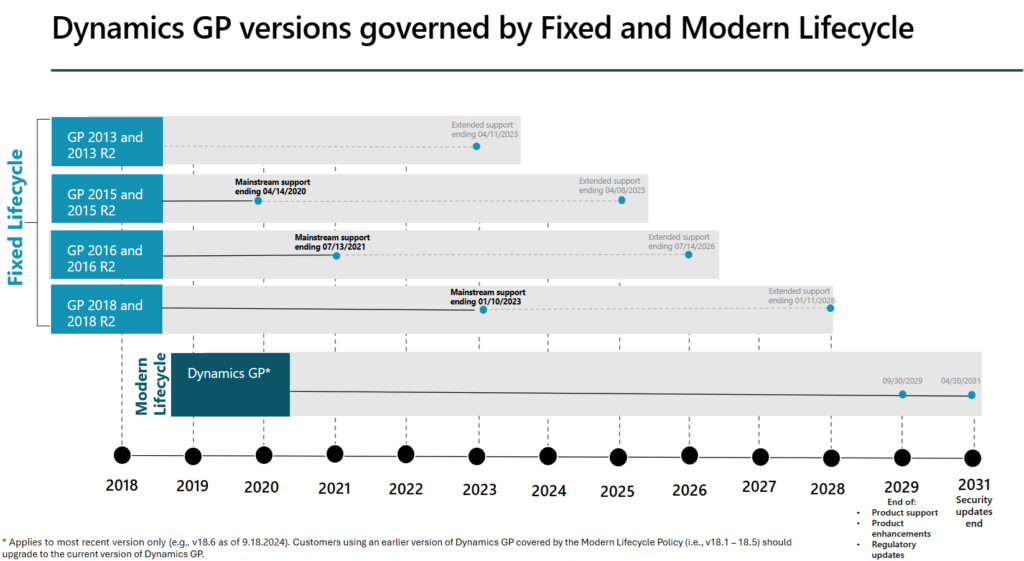
dynamics gp end of life and mainstream support deadlines by Dynamics GP version and by Fixed Lifecycle vs Modern Lifecycle

Dynamics GP Modern Lifecycle:

  • September 30, 2029 – Microsoft will cease all product support for Dynamics GP. This means no new updates or customer support will be available.
  • April 30, 2031 – Microsoft will stop releasing security updates. This will leave Dynamics GP unprotected against security threats.

Dynamics GP Fixed Lifecycle

Depending on the version you are on, you may have already reached the end of mainstream and extended support. For Dynamics GP 2016 and 2016 R2, mainstream support ended in 2021, and extended support ends very soon in 2026. For Dynamics GP 2018 and 2018 R2, mainstream support ended January 1, 2023. Extended support ends January 11, 2028.

Meanwhile, for Dynamics GP 2013, 2013 R2, 2015 and 2015 R2, Extended support has also ended. Which means those 4 versions of Dynamics GP have no official support from Microsoft. Equally, Dynamics GP partners are reluctant to provide support to those unsupported legacy versions and strongly recommend migrating Dynamics GP to Business Central as soon as possible to maintain the integrity of your financial systems and data security.

dynamics gp to business central migration ebook

8 Expert Tips to Move from Dynamics GP to Business Central

Prepare for a migration to Dynamics 365 Business Central

A practical guide from 360 Visibility’s Dynamics 365 Consultants to expertly execute a successful Dynamics GP migration.

Download the free Dynamics GP Migration guide now


Dynamics GP End of Life – What does this mean for my business?

Microsoft’s decision to end support for Dynamics GP is part of its greater commitment to innovation with modern, cloud-based systems. Using unsupported software exposes businesses to significant risks. Without security updates, Dynamics GP is vulnerable to cyberattacks, increasing the likelihood of data breaches and loss of sensitive financial information.

Additionally, businesses may face compliance issues, as unsupported systems may not meet regulatory requirements, potentially resulting in fines or legal penalties.

A Dynamics GP Migration to Business Central is the recommended course of action for all businesses using Dynamics GP.

Consequences for Businesses Running Dynamics GP

Many business still rely on Dynamics GP despite knowing it’s approaching End of Support status. We want to make it clear what this means for your business. We’ve provided examples of how it can affect your operations, finances, and long-term strategy.

1. Operational Risks

Without regular updates or support, businesses using Dynamics GP face significant operational disruptions. When issues arise, such as system bugs, errors, or data corruption, you won’t have access to Microsoft’s support team to resolve them. Additionally, the software won’t evolve to adapt to new business needs or industry changes.

In many cases, we have seen Microsoft Partners no longer supporting legacy Dynamics GP users. In these cases, we encourage you to migrate Dynamics GP to Dynamics 365 Business Central.

Example Scenario:

Imagine a month-end financial close being delayed because your team encounters a critical bug. With Dynamics GP, fixing this issue could take days or even weeks, leading to reporting delays and impacting business-critical decisions like budgeting, forecasting, and strategic investments.

2. Financial Implications

The cost of maintaining an outdated system goes far beyond just keeping the software running. You may need to hire specialized consultants for support and custom updates. Internal IT teams may struggle to manage the increasingly outdated platform. Over time, these costs can escalate, often outweighing the expense of migrating to a modern solution like Dynamics 365 Business Central.

Furthermore, remaining on an unsupported system can lead to non-compliance with industry regulations. As laws and standards evolve, your outdated software may no longer meet necessary criteria for data security or financial reporting, exposing your business to penalties.

Example Scenario:

A manufacturing company using Dynamics GP fails a routine compliance audit because their system doesn’t meet new GDPR or PCI-DSS security standards. As a result, they face a $100,000 fine and must spend additional money to implement workarounds that a modern ERP system would have handled automatically.
dynamics gp to dynamics 365 business central migration heart and stroke
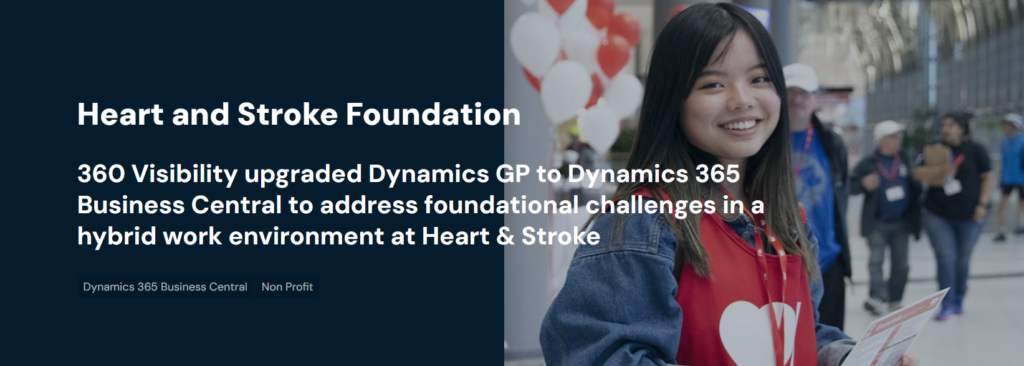
The Heart & Stroke Foundation of Canada was facing challenges with an outdated Microsoft Dynamics GP system during their transition to a hybrid work model. In response, they sought a cloud-based solution to enhance collaboration and streamline their financial processes.

3. Strategic Considerations

End of Life for Dynamics GP can limit your business’s agility and competitiveness. Without access to new features, you miss out on innovations like AI-driven analytics, automation, and real-time reporting that competitors on modern systems use to make smarter decisions faster. As the market shifts, businesses running outdated software find it harder to adapt, leaving them at a disadvantage.

Example Scenario:

A retail business still using Dynamics GP finds that they can’t keep up with a competitor who has transitioned to a cloud-based ERP system. The competitor can analyze real-time sales data, optimize inventory, and respond instantly to customer trends. Meanwhile, the retailer on Dynamics GP struggles with manual processes and outdated reporting, resulting in lost revenue and declining customer satisfaction.

4. Challenges in Integrating with Modern Technologies

Legacy systems like Dynamics GP are increasingly difficult to integrate with modern business technologies. As companies adopt cloud services, AI tools, and advanced analytics, GP’s outdated architecture makes integration slow, complex, and costly. This results in siloed data, inefficient workflows, and missed opportunities to leverage cutting-edge technology for growth.

Example Scenario:

A professional services firm wants to integrate a new AI-powered financial forecasting tool to improve decision-making. However, their Dynamics GP system can’t easily connect to modern platforms, causing the firm to rely on manual data transfers, increasing the risk of errors and missed opportunities for optimization.

Staying on Dynamics GP as it approaches End of Support can cause real operational setbacks, rising costs, and diminished competitiveness. Proactively planning a migration to Dynamics 365 Business Central can help your business avoid these risks while positioning you for future growth.

Next Steps

1. Timeline for Transition

To ensure a smooth migration from Dynamics GP to a Dynamics 365 Business Central, businesses should be aware of the following deadlines:

  • September 30, 2029: Microsoft announced End of Product Support for Dynamics GP. All support services, including updates and technical assistance, will cease.
  • April 30, 2031: End of Security Updates from Microsoft. After this date, no further security patches will be released, exposing your business to potential vulnerabilities.

2. Immediate Actions

Businesses should take proactive steps now to prepare for the transition:

  • Conduct a System Review: Evaluate your current Dynamics GP usage, identify critical functionalities, and assess data integrity. This helps determine what functions and processes are required in Business Central.
  • Establish a Migration Plan: Outline a detailed timeline for the migration process, including key tasks, resources needed, and stakeholder involvement. This plan should prioritize data migration, training, and testing phases.
  • Engage Stakeholders: Involve key personnel from finance, IT, and operations to ensure alignment on the migration strategy. Gathering insights from various departments can help identify potential challenges early.
  • Research Migration Partners: Look for experienced Microsoft partners who specialize in Dynamics GP migrations. Consultations with experts can provide valuable insights into best practices and potential pitfalls.

3. Resources and Support

Utilize available resources from Microsoft and partners to facilitate your migration:

  • Migration Tools and Resources: Explore the Microsoft Dynamics website for official documentation, migration guides, and best practices tailored to Dynamics GP users transitioning to Dynamics 365.
  • Webinars and Training Sessions: Attend training sessions or webinars offered by Microsoft and certified partners that cover migration strategies, system functionalities, and user training for Dynamics 365.
  • Community Forums and Support: Engage with online forums and user communities where you can ask questions and share experiences with other Dynamics GP users undergoing similar transitions.
  • Partner Services: Consider partnering with certified Microsoft consultants who can provide tailored migration services, training, and ongoing support to ensure a seamless transition.

By following this structured approach and adhering to the timeline, businesses can effectively navigate the transition from Dynamics GP.

Dynamics GP End of Life: Closing the chapter on Dynamics GP in favor of Dynamics 365 Business Central

As Microsoft signals Dynamics GP end of life, product support draws to a close, and the risks associated with remaining on an unsupported platform—such as operational disruptions, security vulnerabilities, and compliance issues—become increasingly significant. By migrating Dynamics GP to Business Central, organizations can leverage enhanced functionality, cloud capabilities, and advanced security features that allow them to optimize their operations and drive growth.

We encourage you to take proactive steps now to ensure a smooth and successful migration. Start by assessing your current systems, identifying your migration needs, and engaging with trusted Microsoft Dynamics partners who can guide you through the transition. The earlier you begin the process, the more prepared you will be to capitalize on the benefits of Business Central.

For further assistance in planning your migration from Dynamics GP to Dynamics 365 Business Central, please don’t hesitate to reach out to our team. We are here to help you navigate this critical transition and ensure your organization thrives in the future.

Taking the first step towards migration today can position your business for a successful and sustainable future.
dynamics gp end of life migration business central
Barbara Allen

Barbara Allen

Barb is our Vice President of Client Solutions. She is tasked with building and maintaining relationships with key accounts and implementing strategies that align with their business goals. She has worked in various industries holding several key leadership positions. Barb also successfully implemented ERP systems such as Microsoft Dynamics for organizations of all sizes - from start-ups companies with two users, to Fortune 500 companies with over 1,400 users.

See all my posts

Related Posts

  • Microsoft Dynamics 365 Business Central
  • Microsoft Dynamics GP

Jul 24, 2026

GP to Business Central Migration: The Complete Executive Playbook

Business has changed. For years, Microsoft Dynamics GP has helped organizations manage finance, operations, and reporting with confidence. It has been a reliable ERP solution for […]

Keep reading
  • Microsoft Dynamics 365 Business Central

Jul 8, 2026

GP to Business Central Migration: Common Pitfalls to Avoid

With Microsoft shifting its focus toward cloud-based solutions and modern ERP capabilities, GP to Business Central offers a path for organizations looking to improve efficiency and […]

Keep reading
  • Microsoft Dynamics 365 Business Central

Jun 9, 2026

Absolute Business Central Implementation Checklist

Implementing a new ERP system is a significant milestone for any organization. Whether you are replacing outdated accounting software, moving away from disconnected systems, or preparing […]

Keep reading
360 Visibility

360 Visibility is a Microsoft Cloud Solution Provider (CSP) holding Microsoft Solutions Partner designations in Security, Cloud & AI Platforms, and AI Business Solutions.

With over 20 years of experience across Microsoft 365, Dynamics 365, Azure, and Copilot, we help organizations modernize operations, strengthen security, and adopt AI with confidence.

microsoft solutions partner, dynamics 365 business central implementation partner, dynamics 365 sales implementation partner
microsoft solutions partner, microsoft 365 security, defender, entra id, cloud security, microsoft purview
microsoft solutions partner, microsoft 365, office 365, sharepoint, teams phone system
microsoft solutions partner, azure cloud, cloud migration, it governance, technology advisory
microsoft solutions partner badge for digital app and innovation azure
Dynamics 365 Services
  • Dynamics 365 Business Central Partner
  • Dynamics 365 Business Central Implementation
  • Dynamics GP to Business Central Migration
  • Dynamics NAV to Business Central Upgrade
  • Dynamics 365 Sales Implementation
Copilot AI Services
  • Copilot AI Agent Business Impact Assessment
  • Copilot AI Leadership Circle
  • Microsoft 365 Copilot Readiness Assessment
  • Microsoft Copilot AI
Business Advisory Services
  • Business Impact Assessment
  • Quarterly Business Review
Azure Cloud Services
  • Azure Cloud Implementation Partner
  • Managed Azure Services Provider
  • Azure Infrastructure Modernization and Migration
  • Azure Virtual Desktop
  • IT Governance
Cloud Security Services
  • Microsoft 365 Security Assessment
  • Backup and Disaster Recovery
  • Data Loss Prevention
  • Insider Risk Management
  • Identity and Access Management
  • Information Protection
  • Entra ID Backup
Company & Resources
  • Blog
  • About 360 Visibility
  • Careers
  • Case Studies
  • Documentation
  • Contact Us
Legal & Technical
  • Terms and Conditions
  • Data Security and Data Privacy
  • Privacy Policy
  • Support
  • Clarity CSP Portal

See Clearly. Act Faster.

Copyright © 2026 360 Visibility Inc. All Rights Reserved

✕
✕
✕
No results See all results
  • Dynamics 365
    • Business Central Services
    • Business Central Implementation
    • Dynamics GP to Business Central Migration
    • Dynamics NAV to Business Central Upgrade
    • Business Central Integrations
    • Quick Links
    • Dynamics 365 Business Central Demo Videos
    • Business Central Apps
    • Contactless Banking Bundle for Dynamics 365 Business Central
    • Business Central Blog
    • ERP Evaluation Guide
    • Dynamics 365 Solutions
    • Dynamics 365 Business Central
    • Dynamics 365 Sales
    • Dynamics 365 Contact Center
    • Microsoft Dynamics GP
    • Microsoft Dynamics NAV
  • Cloud
    • Azure Cloud Services
    • Azure Cloud Managed Services
    • Azure Infrastructure Modernization and Migration
    • Azure Virtual Desktop
    • Quick Links
    • Cloud Blog
    • Cloud Migration Guide
    • Cloud Cost Optimization Playbook
    • Cloud Solutions
    • Azure Cloud
    • Power Platform
  • Microsoft 365
    • Microsoft 365 Services
    • Microsoft 365 Implementation
    • Microsoft 365 Support Services
    • Microsoft 365 Security Assessment
    • Microsoft 365 Backup and Disaster Recovery
    • Cybersecurity Services
    • Purview Data Loss Prevention
    • Purview Insider Risk Management
    • Purview Information Protection
    • Entra ID Identity and Access Management (IAM)
    • Entra ID Backup and Recovery
    • Microsoft 365 Solutions
    • Microsoft 365
    • Microsoft Teams Phone
    • Microsoft Places
    • Outlook Email Signature Management
  • Copilot & AI
    • Microsoft Copilot and AI Services
    • Copilot AI Leadership Circle
    • Copilot AI Agent Business Impact Assessment
    • Microsoft 365 Copilot AI Readiness Assessment
    • Quick Links
    • Microsoft 365 Copilot Offer
    • Microsoft 365 Copilot Implementation Guide
    • Copilot and AI Blog
    • Copilot and AI Solutions
    • Microsoft Copilot
    • Microsoft SharePoint
  • Advisory Services
    • Clarity CSP Portal
    • Business Impact Assessment
    • IT Governance
    • Microsoft License Optimization
    • Quarterly Business Review
  • Industries
    • Wholesale Distribution
    • Financial Services
    • Nonprofit
    • Professional Services
    • Software
    • Hospitality
  • Resources
    • Blog
    • Case Studies
    • Documentation
    • Support
  • About
    • About Us
    • Why Work With Us
    • Partner
    • Careers
Contact Us
Clarity
Chat with Claire