

360 Visibility
  • Dynamics 365
    Business Central Services
    • Business Central Implementation
    • Dynamics GP to Business Central Migration
    • Dynamics NAV to Business Central Upgrade
    • Business Central Integrations
    Complimentary Systems Assessment
    Quick Links
    • Business Central Demo Videos
    • Business Central Apps
    • Business Central Contactless Banking Bundle
    • Business Central Blogs
    • ERP Evaluation Guide
    Customer Stories
    dk household brands partners with 360 Visibility to implement Dynamics 365 Business Central

    DK Household Brands implements Business Central with full EDI, WMS, and Shipping integration.

    Read the story
    Dynamics 365 Solutions
    • Dynamics 365 Business Central
    • Dynamics 365 Sales
    • Dynamics 365 Contact Center
    • Dynamics GP
    • Dynamics NAV
  • Cloud
    Azure Cloud Services
    • Azure Cloud Managed Services
    • Cloud Migration and Modernization
    • Azure Virtual Desktop
    Cloud Infrastructure Assessment
    Quick Links
    • Cloud Blog
    • Cloud Migration Guide
    • Cloud Cost Optimization Playbook
    Customer Stories

    How Azure cloud turned physical hardware bottlenecks into a secure, limitless engine for software growth.

    Read the story
    Cloud Solutions
    • Azure Cloud
    • Power Platform
  • Microsoft 365
    Microsoft 365 Services
    • Microsoft 365 Implementation
    • Microsoft 365 Support Services
    • Microsoft 365 Security Administration
    • Microsoft 365 Backup and Disaster Recovery
    Complimentary Microsoft License Audit
    Cybersecurity Services
    • Device Management & Security
    • Ransomware & Endpoint Security
    • Purview Data Loss Prevention
    • Purview Insider Risk Management
    • Purview Information Protection
    • Entra ID Identity and Access Management (IAM)
    • Entra ID Backup and Recovery
    Customer Stories
    pain specialists of america works with 360 Visibility to enhance security and control over Azure

    How reclaiming IT control from their MSP slashed Pain Specialists of America's security incidents by 30%.

    Read the story
    Microsoft 365 Solutions
    • Microsoft 365
    • Microsoft Teams Phone
    • Microsoft Places
    • Outlook Email Signature Management
  • Copilot & AI
    Microsoft Copilot & AI Services
    • Copilot AI Leadership Circle
    • Copilot AI Agent Business Impact Assessment
    Complimentary AI Readiness Snapshot
    Quick Links
    • Microsoft 365 Copilot Offer
    • Microsoft 365 Copilot Implementation Guide
    • Copilot and AI Blog
    Customer Stories

    Financial Services Firms' Custom AI Agent for Case Management automates bulk document analysis, saving 35+ hours daily.

    Read the story
    Copilot & AI Solutions
    • Microsoft Copilot
    • Microsoft SharePoint
  • Advisory Services
    • Clarity CSP Portal
    • Business Impact Assessment
    • IT Governance
    • Microsoft License Optimization
    • Quarterly Business Review
  • Industries
    • Wholesale Distribution
    • Financial Services
    • Nonprofit
    • Professional Services
    • Software
    • Hospitality
  • Resources
    • Blog
    • Case Studies
    • Documentation
    • Support
  • About
    • Why Work With Us
    • Partner
    • Careers
✕
No results See all results
Contact Us
Clarity
360 Visibility
burger-bar

Home / Blog / Microsoft Azure Cloud / How to Enroll Devices in Entra ID

How to Enroll Devices in Entra ID

Learn how to enroll devices in Entra ID and why it matters Microsoft Entra ID is the new name for Azure Active Directory, the cloud-based identity […]

Jason-Meilleur-Headshot-Square
Jason Meilleur

Published: Mar 5, 2024 •

microsoft entra id azure active directory
Table of Contents
  1. Learn how to enroll devices in Entra ID and why it matters
  2. Why use Microsoft Entra ID for device management?
  3. How to enroll devices in Entra ID?
  4. How to backup Entra ID policies

Learn how to enroll devices in Entra ID and why it matters

Microsoft Entra ID is the new name for Azure Active Directory, the cloud-based identity and access management service that connects your employees, customers, and partners to their apps, devices, and data. Microsoft Entra ID provides a unified and secure way to manage your device identities and access policies across your multicloud environment.

In this blog post, I will explain why it is important to use Microsoft Entra ID for your device management and how to enroll devices in Entra ID using two methods: Microsoft Entra join and Microsoft Entra hybrid join.
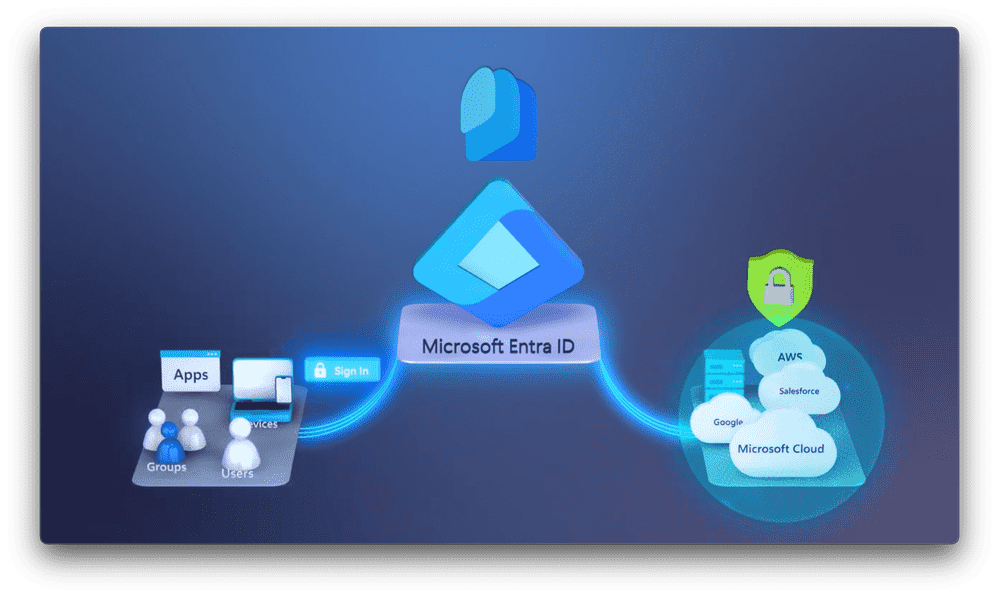
microsoft entra id, azure active directory

Why use Microsoft Entra ID for device management?

Using Microsoft Entra ID for device management has many benefits, such as:

  • Secure adaptive access: You can protect access to your resources and data using strong authentication and risk-based adaptive access policies without compromising user experience. You can also use conditional access, identity protection, and privileged identity management features to enhance your security posture.
  • Seamless user experiences: You can provide a fast, easy sign-in experience across your multicloud environment to keep your users productive, reduce time managing passwords, and increase productivity. You can also enable passwordless and multifactor authentication options for your users.
  • Unified identity management: You can manage all your identities and access to all your applications in a central location, whether they’re in the cloud or on-premises, to improve visibility and control. You can also leverage app integrations and single sign-on capabilities to connect your workforce to all your apps.
enroll devices in Entra ID

How to enroll devices in Entra ID?

There are two ways to enroll devices in Entra ID: Microsoft Entra join and Microsoft Entra hybrid join. Both methods require device registration, which is a prerequisite to cloud-based authentication.

Microsoft Entra join

Microsoft Entra join is the process of joining a device directly to Microsoft Entra ID without the need for on-premises Active Directory. This method is suitable for devices that are cloud-only or that do not need to access on-premises resources.

To enroll devices in Entra join, you can follow these steps:

  1. Turn on your new device and start the setup process. Follow the prompts to set up your device.
  2. When asked to sign in with Microsoft, click on Join this device to Microsoft Entra ID.
  3. Enter your Microsoft Entra ID email and click Next.
  4. Enter your password and click Sign In.
  5. If prompted, accept the terms of use and the device policies.
  6. Complete the rest of the setup process and sign in to your device.
entra id authentication methods setup

Microsoft Entra hybrid join

Microsoft Entra hybrid join is the process of joining a device to both Microsoft Entra ID and on-premises Active Directory. This method is suitable for devices that need to access both cloud and on-premises resources.

To enroll a device using Microsoft Entra hybrid join, you need to have Microsoft Entra Connect installed and configured on your on-premises server. Microsoft Entra Connect is a service that synchronizes your on-premises Active Directory with Microsoft Entra ID.

To enroll devices in Entra hybrid join, you can follow these steps:

  1. Join your device to your on-premises Active Directory domain using the usual process.
  2. Wait for the device to be synchronized to Microsoft Entra ID by Microsoft Entra Connect. This may take up to 30 minutes.
  3. Sign in to your device using your domain credentials.
  4. Open the Access work or school app from the Settings menu.
  5. Click on Connect and then click on Join this device to Microsoft Entra ID.
  6. Enter your Microsoft Entra ID email and click Next.
  7. Enter your password and click Sign In.
  8. If prompted, accept the terms of use and the device policies.

How to backup Entra ID policies

Microsoft Entra ID (formerly Azure AD) does not include native backup capabilities for its configuration settings and policies. This means that critical components like Conditional Access policies, Named Locations, Authentication Methods, and other identity governance settings are vulnerable to accidental deletion, misconfiguration, or malicious changes. Without a backup, restoring these settings manually can be time-consuming, error-prone, and disruptive to business operations.

To address this gap, 365 Entra Export automatically exports and documents your Entra ID configurations. This ensures you have a secure, readable backup that can be referenced or restored when needed. Without such a solution, organizations risk losing access controls and identity protections, potentially leading to compliance issues, security breaches, or downtime.

Microsoft Entra ID is a powerful and flexible solution for device management that can help you secure your access, simplify your user experiences, and unify your identity management. When you enroll devices in Entra ID, you can leverage the full potential of Microsoft Entra ID for your device identities and access policies.

Some of the security benefits of using Microsoft Entra ID include:

  • Protecting your identities and access with strong authentication and risk-based adaptive access policies.
  • Enhancing your security posture with conditional access, identity protection, and privileged identity management features.
  • Reducing the attack surface with least privilege access and permissions management.
  • Detecting and responding to threats faster with Microsoft Security Copilot.
  • Issuing and verifying identity credentials based on open standards with Microsoft Entra Verified ID.

If you are looking for a trusted partner to help you implement and manage Microsoft Entra ID for your device management, you can consider 360 Visibility’s Microsoft Security Administration advisory service. This service provides you with:

  • Monthly review and configuration of each security solution with best practices.
  • Improvement of your cloud security posture so that it is better than the previous month.
  • Review of your overall security report each month so that you are aware of what is going on in your environment.
  • Security awareness training to end-users and assistance with implementing multi-factor authentication.
  • Configuration of SPF, DKIM and DMARC to protect your domains against abuse by phishers and spammers.

To learn more about Microsoft Entra ID and 360 Visibility’s Microsoft Security Administration advisory service, you can visit our website or fill out the contact form.

Jason-Meilleur-Headshot-Square

Jason Meilleur

As the Director of Cloud Solutions at 360 Visibility, Jason is all about putting customers first and ensuring they get the most out of their cloud investments. Whether it's optimizing cloud architecture, enhancing security, or identifying cost-effective strategies, his expertise allows businesses to grow and prepare for the unexpected. Jason comes from a long-line of entrepreneurs and has learned the importance of innovation, collaboration and grit.

See all my posts

Related Posts

  • Microsoft 365
  • Security

Jul 24, 2026

Conditional Access Policies: Securing Your Microsoft 365 Environment

Conditional access has become one of the most important security capabilities within Microsoft 365. Rather than granting or denying access based on a single login, conditional […]

Keep reading
  • Uncategorized
  • Microsoft 365
  • Security

Jul 10, 2026

7 Steps to Implement Passwordless Authentication in Microsoft 365

Passwords have been around for decades, and frankly… they’re showing their age. They’re forgotten, reused, written on sticky notes, or stored in spreadsheets with names like […]

Keep reading
  • Microsoft Azure Cloud

Jul 8, 2026

Cloud Cost Optimization: How Reserved Instances Save You Money

Did you know that one of the most effective ways to reduce Azure costs without sacrificing performance is through Azure Reserved Instances? In this blog, we’ll […]

Keep reading
360 Visibility

360 Visibility is North America’s leading AI-first Microsoft Cloud Partner, helping businesses See Clearly and Act Faster.

With 20+ years of expertise in Microsoft 365, Dynamics 365, Azure, and Copilot, we deliver purpose-built AI solutions that transform operations and drive measurable impact.

microsoft solutions partner, dynamics 365 business central implementation partner, dynamics 365 sales implementation partner
microsoft solutions partner, microsoft 365 security, defender, entra id, cloud security, microsoft purview
microsoft solutions partner, microsoft 365, office 365, sharepoint, teams phone system
microsoft solutions partner, azure cloud, cloud migration, it governance, technology advisory
Dynamics 365 Services
  • Dynamics 365 Business Central Partner
  • Dynamics 365 Business Central Implementation
  • Dynamics GP to Business Central Migration
  • Dynamics NAV to Business Central Upgrade
  • Dynamics 365 Sales Implementation
Copilot AI Services
  • Copilot AI Agent Business Impact Assessment
  • Copilot AI Leadership Circle
  • Microsoft 365 Copilot Readiness Assessment
  • Microsoft Copilot AI
Business Advisory Services
  • Business Impact Assessment
  • Quarterly Business Review
Azure Cloud Services
  • Azure Cloud Implementation Partner
  • Managed Azure Services Provider
  • Cloud Migration & Application Modernization
  • Azure Virtual Desktop
  • IT Governance
Cloud Security Services
  • Microsoft 365 Managed Security Administration
  • Backup and Disaster Recovery
  • Data Loss Prevention
  • Insider Risk Management
  • Identity and Access Management
  • Information Protection
  • Entra ID Backup
Company & Resources
  • Blog
  • About 360 Visibility
  • Careers
  • Case Studies
  • Documentation
  • Contact Us
Legal & Technical
  • Terms and Conditions
  • Privacy Policy
  • Support
  • Clarity CSP Portal

See Clearly. Act Faster.

Copyright © 2026 360 Visibility Inc. All Rights Reserved

✕
✕
✕
No results See all results
  • Dynamics 365
    • Business Central Services
    • Business Central Implementation
    • Dynamics GP to Business Central Migration
    • Dynamics NAV to Business Central Upgrade
    • Business Central Integrations
    • Quick Links
    • Dynamics 365 Business Central Demo Videos
    • Business Central Apps
    • Contactless Banking Bundle for Dynamics 365 Business Central
    • Business Central Blog
    • ERP Evaluation Guide
    • Dynamics 365 Solutions
    • Dynamics 365 Business Central
    • Dynamics 365 Sales
    • Dynamics 365 Contact Center
    • Microsoft Dynamics GP
    • Microsoft Dynamics NAV
  • Cloud
    • Azure Cloud Services
    • Azure Cloud Managed Services
    • Cloud Migration and Modernization
    • Azure Virtual Desktop
    • Quick Links
    • Cloud Blog
    • Cloud Migration Guide
    • Cloud Cost Optimization Playbook
    • Cloud Solutions
    • Azure Cloud
    • Power Platform
  • Microsoft 365
    • Microsoft 365 Services
    • Microsoft 365 Implementation
    • Microsoft 365 Support Services
    • Microsoft 365 Security Administration
    • Microsoft 365 Backup and Disaster Recovery
    • Cybersecurity Services
    • Purview Data Loss Prevention
    • Purview Insider Risk Management
    • Purview Information Protection
    • Entra ID Identity and Access Management (IAM)
    • Entra ID Backup and Recovery
    • Microsoft 365 Solutions
    • Microsoft 365
    • Microsoft Teams Phone
    • Microsoft Places
    • Outlook Email Signature Management
  • Copilot & AI
    • Microsoft Copilot and AI Services
    • Copilot AI Leadership Circle
    • Copilot AI Agent Business Impact Assessment
    • Microsoft 365 Copilot AI Readiness Assessment
    • Quick Links
    • Microsoft 365 Copilot Offer
    • Microsoft 365 Copilot Implementation Guide
    • Copilot and AI Blog
    • Copilot and AI Solutions
    • Microsoft Copilot
    • Microsoft SharePoint
  • Advisory Services
    • Clarity CSP Portal
    • Business Impact Assessment
    • IT Governance
    • Microsoft License Optimization
    • Quarterly Business Review
  • Industries
    • Wholesale Distribution
    • Financial Services
    • Nonprofit
    • Professional Services
    • Software
    • Hospitality
  • Resources
    • Blog
    • Case Studies
    • Documentation
    • Support
  • About
    • About Us
    • Why Work With Us
    • Partner
    • Careers
Contact Us
Clarity
Chat with Claire