360 Visibility
  • Dynamics 365
    Business Central Services
    • Business Central Implementation
    • Dynamics GP to Business Central Migration
    • Dynamics NAV to Business Central Upgrade
    • Business Central Integrations
    Complimentary Systems Assessment
    Quick Links
    • Business Central Demo Videos
    • Business Central Apps
    • Business Central Contactless Banking Bundle
    • Business Central Blogs
    • ERP Evaluation Guide
    Customer Stories
    dk household brands partners with 360 Visibility to implement Dynamics 365 Business Central

    DK Household Brands implements Business Central with full EDI, WMS, and Shipping integration.

    Read the story
    Dynamics 365 Solutions
    • Dynamics 365 Business Central
    • Dynamics 365 Sales
    • Dynamics 365 Contact Center
    • Dynamics GP
    • Dynamics NAV
  • Cloud
    Azure Cloud Services
    • Azure Cloud Managed Services
    • Cloud Migration and Modernization
    • Azure Virtual Desktop
    Cloud Infrastructure Assessment
    Quick Links
    • Cloud Blog
    • Cloud Migration Guide
    • Cloud Cost Optimization Playbook
    Customer Stories

    How Azure cloud turned physical hardware bottlenecks into a secure, limitless engine for software growth.

    Read the story
    Cloud Solutions
    • Azure Cloud
    • Power Platform
  • Microsoft 365
    Microsoft 365 Services
    • Microsoft 365 Implementation
    • Microsoft 365 Support Services
    • Microsoft 365 Security Administration
    • Microsoft 365 Backup and Disaster Recovery
    Complimentary Microsoft License Audit
    Cybersecurity Services
    • Device Management & Security
    • Ransomware & Endpoint Security
    • Purview Data Loss Prevention
    • Purview Insider Risk Management
    • Purview Information Protection
    • Entra ID Identity and Access Management (IAM)
    • Entra ID Backup and Recovery
    Customer Stories
    pain specialists of america works with 360 Visibility to enhance security and control over Azure

    How reclaiming IT control from their MSP slashed Pain Specialists of America's security incidents by 30%.

    Read the story
    Microsoft 365 Solutions
    • Microsoft 365
    • Microsoft Teams Phone
    • Microsoft Places
    • Outlook Email Signature Management
  • Copilot & AI
    Microsoft Copilot & AI Services
    • Copilot AI Leadership Circle
    • Copilot AI Agent Business Impact Assessment
    Complimentary AI Readiness Snapshot
    Quick Links
    • Microsoft 365 Copilot Offer
    • Microsoft 365 Copilot Implementation Guide
    • Copilot and AI Blog
    Customer Stories

    Financial Services Firms' Custom AI Agent for Case Management automates bulk document analysis, saving 35+ hours daily.

    Read the story
    Copilot & AI Solutions
    • Microsoft Copilot
    • Microsoft SharePoint
  • Advisory Services
    • Clarity CSP Portal
    • Business Impact Assessment
    • IT Governance
    • Microsoft License Optimization
    • Quarterly Business Review
  • Industries
    • Wholesale Distribution
    • Financial Services
    • Nonprofit
    • Professional Services
    • Software
    • Hospitality
  • Resources
    • Blog
    • Case Studies
    • Documentation
    • Support
  • About
    • Why Work With Us
    • Partner
    • Careers
✕
No results See all results
Contact Us
Clarity
360 Visibility
burger-bar

Home / Blog / Microsoft Copilot / How Copilot for Excel Enhances Year End Reporting

How Copilot for Excel Enhances Year End Reporting

In the modern business world, data-driven decision making is crucial. Financial decision-makers need to quickly analyze vast amounts of data, generate insights, and make informed decisions. […]

Barbara Allen
Barbara Allen

Published: Mar 28, 2024 •

Table of Contents
  1. What is Microsoft Copilot for Excel?
  2. Why is this Capability Crucial to Businesses?
  3. A step-by-step guide on how Copilot for Excel can speed up and automate your financial reporting process:
  4. Examples of other Scenarios, Reports or Insights you can ask Copilot

In the modern business world, data-driven decision making is crucial. Financial decision-makers need to quickly analyze vast amounts of data, generate insights, and make informed decisions. This is where Microsoft Copilot for Excel comes into play.

What is Microsoft Copilot for Excel?

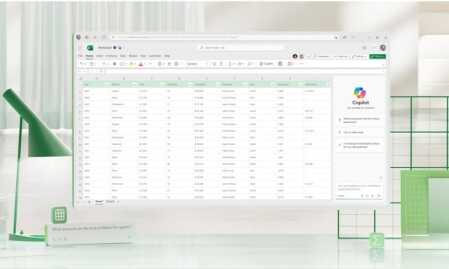
Microsoft Copilot is an AI-powered assistant that integrates seamlessly with Excel. It understands natural language queries, performs complex calculations, generates reports, and even forecasts future trends based on historical data. It’s like having a financial analyst, data scientist, and Excel expert all rolled into one.

Why is this Capability Crucial to Businesses?

  1. Time and Cost Efficiency: Automating tasks with Copilot for Excel can significantly reduce the time spent on data analysis and report generation, leading to cost savings.
  2. Increased Accuracy: Copilot reduces the risk of human error in data analysis and calculations, ensuring more accurate financial reports.
  3. Insight Generation: Copilot for Excel can identify trends and patterns in your data that might be missed by human analysts, leading to new insights and better decision making.
  4. Accessibility: With its natural language processing capabilities, non-technical users can also leverage Copilot to analyze data and generate reports, democratizing data analysis within your organization.
  5. Visualization: Copilot can convert complex data sets into intuitive graphs and make forecasts, creating endless possibilities to gain insights.

A step-by-step guide on how Copilot for Excel can speed up and automate your financial reporting process:

Step 1: Data Preparation

Before you start, ensure your financial data is well-structured and organized in Excel. This includes cleaning up any inconsistencies and ensuring data types are correctly formatted.

Step 2: Ask Microsoft Copilot

To ask Microsoft Copilot, simply type your natural language request by opening Copilot in the ribbon menu. For example, if you want to calculate the total revenue for the year, you might ask "Calculate total revenue for 2023".

Step 3: Leverage Copilot’s Capabilities

Microsoft Copilot can perform a wide range of tasks, including but not limited to:

  • Data Analysis: Use Copilot to perform complex calculations, generate summaries, and identify trends in your data. For example, "Identify the month with the highest sales in 2023".
  • Forecasting: Copilot can help with forecasting future financials based on historical data. For example, "Forecast sales for Q1 2024 based on 2023 data".
  • Automation: Automate repetitive tasks such as generating monthly reports. For example, "Generate a monthly sales report for 2023".
  • Visualize: Copilot can create charts and graphs to showcase results. For example, "Show sales growth by units sold per month in 2023".

Step 4: Review and Refine

After Copilot generates the results, review them for accuracy. If needed, you can refine your request for more specific results, or ask Copilot follow up questions to gain more insights from the data.

Step 5: Incorporate Results into Reports

Once you’re satisfied with the results, incorporate them into your financial reports. You can also use Copilot in PowerPoint to help format these reports for presentation.

Remember, Microsoft Copilot is a tool designed to assist and enhance your work, not replace your expertise. Always review and verify the results it provides. Happy reporting!

Examples of other Scenarios, Reports or Insights you can ask Copilot

Beyond year-end financial reporting, Copilot for Excel can be used in various scenarios:

  1. Budget Planning: "Generate a budget plan for 2024 based on 2023 data"
  2. Expense Tracking: "Track monthly expenses for 2023"
  3. Profit Analysis: "Analyze profit margins for each product category in 2023"
  4. Sales Forecasting: "Forecast sales for 2024 based on 2023 data"
  5. Risk Assessment: "Assess financial risks based on 2023 data"

More Ways to Use Copilot in Excel

Microsoft Copilot for Excel is a powerful tool that can revolutionize the way businesses handle their financial reporting. By reducing time and cost, increasing efficiency, and generating new insights, it’s an invaluable asset for any financial decision-maker. Start leveraging Copilot today and take your financial reporting to the next level.

Barbara Allen

Barbara Allen

Barb is our Vice President of Client Solutions. She is tasked with building and maintaining relationships with key accounts and implementing strategies that align with their business goals. She has worked in various industries holding several key leadership positions. Barb also successfully implemented ERP systems such as Microsoft Dynamics for organizations of all sizes - from start-ups companies with two users, to Fortune 500 companies with over 1,400 users.

See all my posts

Related Posts

There are no posts on the list.
360 Visibility

360 Visibility is North America’s leading AI-first Microsoft Cloud Partner, helping businesses See Clearly and Act Faster.

With 20+ years of expertise in Microsoft 365, Dynamics 365, Azure, and Copilot, we deliver purpose-built AI solutions that transform operations and drive measurable impact.

microsoft solutions partner, dynamics 365 business central implementation partner, dynamics 365 sales implementation partner
microsoft solutions partner, microsoft 365 security, defender, entra id, cloud security, microsoft purview
microsoft solutions partner, microsoft 365, office 365, sharepoint, teams phone system
microsoft solutions partner, azure cloud, cloud migration, it governance, technology advisory
Dynamics 365 Services
  • Dynamics 365 Business Central Partner
  • Dynamics 365 Business Central Implementation
  • Dynamics GP to Business Central Migration
  • Dynamics NAV to Business Central Upgrade
  • Dynamics 365 Sales Implementation
Copilot AI Services
  • Copilot AI Agent Business Impact Assessment
  • Copilot AI Leadership Circle
  • Microsoft 365 Copilot Readiness Assessment
  • Microsoft Copilot AI
Business Advisory Services
  • Business Impact Assessment
  • Quarterly Business Review
Azure Cloud Services
  • Azure Cloud Implementation Partner
  • Managed Azure Services Provider
  • Cloud Migration & Application Modernization
  • Azure Virtual Desktop
  • IT Governance
Cloud Security Services
  • Microsoft 365 Managed Security Administration
  • Backup and Disaster Recovery
  • Data Loss Prevention
  • Insider Risk Management
  • Identity and Access Management
  • Information Protection
  • Entra ID Backup
Company & Resources
  • Blog
  • About 360 Visibility
  • Careers
  • Case Studies
  • Documentation
  • Contact Us
Legal & Technical
  • Terms and Conditions
  • Privacy Policy
  • Support
  • Clarity CSP Portal

See Clearly. Act Faster.

Copyright © 2026 360 Visibility Inc. All Rights Reserved

✕
✕
✕
No results See all results
  • Dynamics 365
    • Business Central Services
    • Business Central Implementation
    • Dynamics GP to Business Central Migration
    • Dynamics NAV to Business Central Upgrade
    • Business Central Integrations
    • Quick Links
    • Dynamics 365 Business Central Demo Videos
    • Business Central Apps
    • Contactless Banking Bundle for Dynamics 365 Business Central
    • Business Central Blog
    • ERP Evaluation Guide
    • Dynamics 365 Solutions
    • Dynamics 365 Business Central
    • Dynamics 365 Sales
    • Dynamics 365 Contact Center
    • Microsoft Dynamics GP
    • Microsoft Dynamics NAV
  • Cloud
    • Azure Cloud Services
    • Azure Cloud Managed Services
    • Cloud Migration and Modernization
    • Azure Virtual Desktop
    • Quick Links
    • Cloud Blog
    • Cloud Migration Guide
    • Cloud Cost Optimization Playbook
    • Cloud Solutions
    • Azure Cloud
    • Power Platform
  • Microsoft 365
    • Microsoft 365 Services
    • Microsoft 365 Implementation
    • Microsoft 365 Support Services
    • Microsoft 365 Security Administration
    • Microsoft 365 Backup and Disaster Recovery
    • Cybersecurity Services
    • Purview Data Loss Prevention
    • Purview Insider Risk Management
    • Purview Information Protection
    • Entra ID Identity and Access Management (IAM)
    • Entra ID Backup and Recovery
    • Microsoft 365 Solutions
    • Microsoft 365
    • Microsoft Teams Phone
    • Microsoft Places
    • Outlook Email Signature Management
  • Copilot & AI
    • Microsoft Copilot and AI Services
    • Copilot AI Leadership Circle
    • Copilot AI Agent Business Impact Assessment
    • Microsoft 365 Copilot AI Readiness Assessment
    • Quick Links
    • Microsoft 365 Copilot Offer
    • Microsoft 365 Copilot Implementation Guide
    • Copilot and AI Blog
    • Copilot and AI Solutions
    • Microsoft Copilot
    • Microsoft SharePoint
  • Advisory Services
    • Clarity CSP Portal
    • Business Impact Assessment
    • IT Governance
    • Microsoft License Optimization
    • Quarterly Business Review
  • Industries
    • Wholesale Distribution
    • Financial Services
    • Nonprofit
    • Professional Services
    • Software
    • Hospitality
  • Resources
    • Blog
    • Case Studies
    • Documentation
    • Support
  • About
    • About Us
    • Why Work With Us
    • Partner
    • Careers
Contact Us
Clarity