



360 Visibility
  • Dynamics 365
    Business Central Services
    • Business Central Implementation
    • Dynamics GP to Business Central Migration
    • Dynamics NAV to Business Central Upgrade
    • Business Central Integrations
    Complimentary Systems Assessment
    Quick Links
    • Business Central Demo Videos
    • Business Central Apps
    • Business Central Contactless Banking Bundle
    • Business Central Blogs
    • ERP Evaluation Guide
    Customer Stories
    dk household brands partners with 360 Visibility to implement Dynamics 365 Business Central

    DK Household Brands implements Business Central with full EDI, WMS, and Shipping integration.

    Read the story
    Dynamics 365 Solutions
    • Dynamics 365 Business Central
    • Dynamics 365 Sales
    • Dynamics 365 Contact Center
    • Dynamics GP
    • Dynamics NAV
  • Cloud
    Azure Cloud Services
    • Azure Cloud Managed Services
    • Cloud Migration and Modernization
    • Azure Virtual Desktop
    Cloud Infrastructure Assessment
    Quick Links
    • Cloud Blog
    • Cloud Migration Guide
    • Cloud Cost Optimization Playbook
    Customer Stories

    How Azure cloud turned physical hardware bottlenecks into a secure, limitless engine for software growth.

    Read the story
    Cloud Solutions
    • Azure Cloud
    • Power Platform
  • Microsoft 365
    Microsoft 365 Services
    • Microsoft 365 Implementation
    • Microsoft 365 Support Services
    • Microsoft 365 Security Administration
    • Microsoft 365 Backup and Disaster Recovery
    Complimentary Microsoft License Audit
    Cybersecurity Services
    • Device Management & Security
    • Ransomware & Endpoint Security
    • Purview Data Loss Prevention
    • Purview Insider Risk Management
    • Purview Information Protection
    • Entra ID Identity and Access Management (IAM)
    • Entra ID Backup and Recovery
    Customer Stories
    pain specialists of america works with 360 Visibility to enhance security and control over Azure

    How reclaiming IT control from their MSP slashed Pain Specialists of America's security incidents by 30%.

    Read the story
    Microsoft 365 Solutions
    • Microsoft 365
    • Microsoft Teams Phone
    • Microsoft Places
    • Outlook Email Signature Management
  • Copilot & AI
    Microsoft Copilot & AI Services
    • Copilot AI Leadership Circle
    • Copilot AI Agent Business Impact Assessment
    Complimentary AI Readiness Snapshot
    Quick Links
    • Microsoft 365 Copilot Offer
    • Microsoft 365 Copilot Implementation Guide
    • Copilot and AI Blog
    Customer Stories

    Financial Services Firms' Custom AI Agent for Case Management automates bulk document analysis, saving 35+ hours daily.

    Read the story
    Copilot & AI Solutions
    • Microsoft Copilot
    • Microsoft SharePoint
  • Advisory Services
    • Clarity CSP Portal
    • Business Impact Assessment
    • IT Governance
    • Microsoft License Optimization
    • Quarterly Business Review
  • Industries
    • Wholesale Distribution
    • Financial Services
    • Nonprofit
    • Professional Services
    • Software
    • Hospitality
  • Resources
    • Blog
    • Case Studies
    • Documentation
    • Support
  • About
    • Why Work With Us
    • Partner
    • Careers
✕
No results See all results
Contact Us
Clarity
360 Visibility
burger-bar

Home / Blog / Microsoft Dynamics 365 Business Central / How to Remove Object Permission Errors in Microsoft Dynamics 365 Business Central

How to Remove Object Permission Errors in Microsoft Dynamics 365 Business Central

This article will focus on troubleshooting MS Dynamics 365 Business Central permission errors that occur in a production environment after installing a new App or Custom […]

1707492555426
Randy Villanueva

Published: Jan 26, 2021 •

Table of Contents
  1. Troubleshoot Business Central Errors
  2. Customer Care
  3. Want More Business Central Tips and How-To's?

This article will focus on troubleshooting MS Dynamics 365 Business Central permission errors that occur in a production environment after installing a new App or Custom Extension. Installing a new app or custom extension in a production environment could suddenly generate insufficient object access errors, break automation and scheduled data sync, and integration. 

Your Business Central integration tasks in job queues suddenly stopped working and started generating permission errors. Or worse, your integration partners are reporting access errors while all other internal users are fine or at least have not encountered the issue yet.

In odd cases, you created your own custom extension, created new tables and pages, extended a few objects, and all is good in dev and staging environments, only to find users are getting permission issues once you deploy on production.

Troubleshoot Business Central Errors

If the above scenarios are familiar, you could troubleshoot these types of errors in Business Central by looking at the following:

  1. Check the user profile, find the (ex. integration user) account and review the permission set assignments
  2. Check for available permission sets from installed Apps or Extensions
  3. Import a Permission Set XML file 
  4. Review per Object Type permissions under your user security profiles

1. Check the integration User Account

Go to the account card and review your integration account, web access service key, web service expiry date and permission sets. 

Figure 1
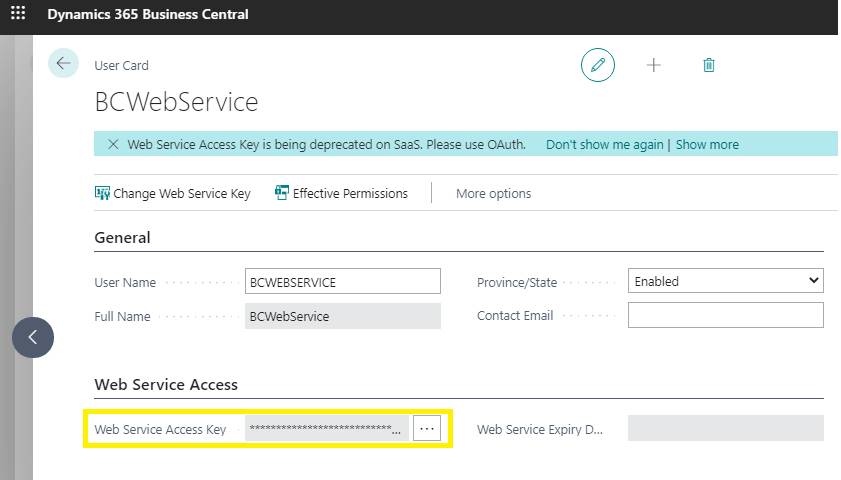
image001

2. Check User Permission Sets from installed Apps or Extensions

One quick way to look at it is to check if a new extension or app that is recently installed may be causing the permission issue. If this is the case, the permission set should be installed with the App and appear in the Permissions list. 

HOW TO: You may check in Extensions Management > Installed Extensions or in Extensions Management > Installed Extensions > Manage > Extension Deployment Status.

Figure 2
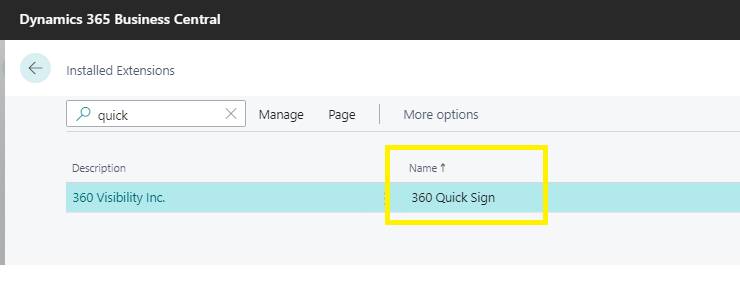
image003

Figure 3: Check if the Permission Set is available in the Permission Set Lookup list.
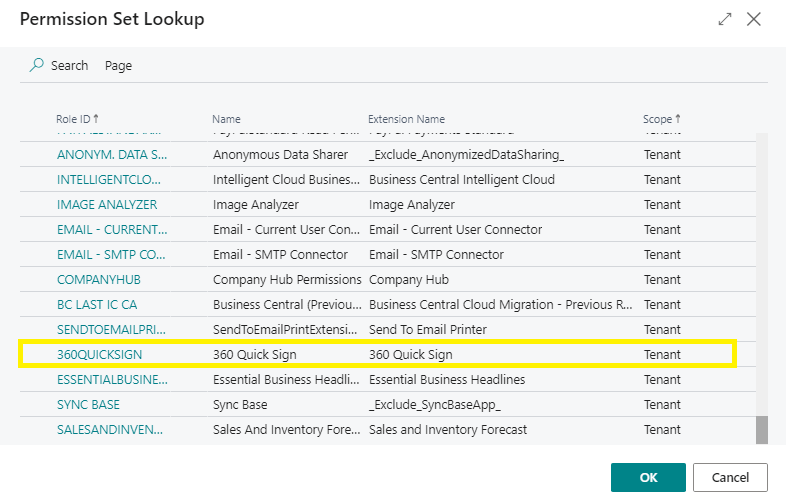
image005

Figure 4: From the user card, go to the User Permission Set Section. If the Permission Set is available in the Permission Set Lookup list, you may now assign it to the user and confirm access.
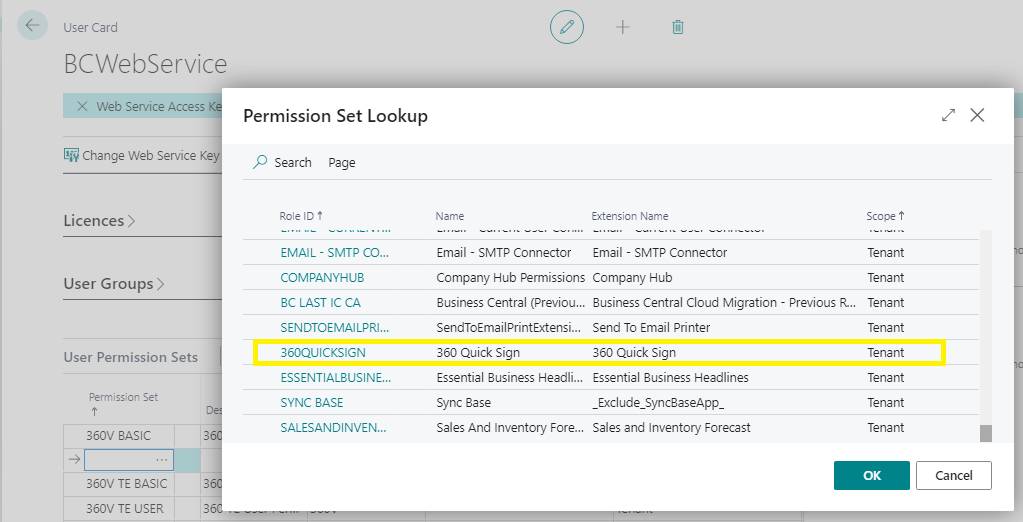
image007

3. Import a Permission Set XML File

If a missing permission set is a custom extension, it can be exported as an XML file using Visual Studio Code by your dev team, and you could import it to your production environment. Once imported, the Permission Set will appear in the Permission Set Lookup.

HOW TO: Assign a Permission Set from an XML file provided by your internal dev team.

Figure 6: Permission Set XML File Sample
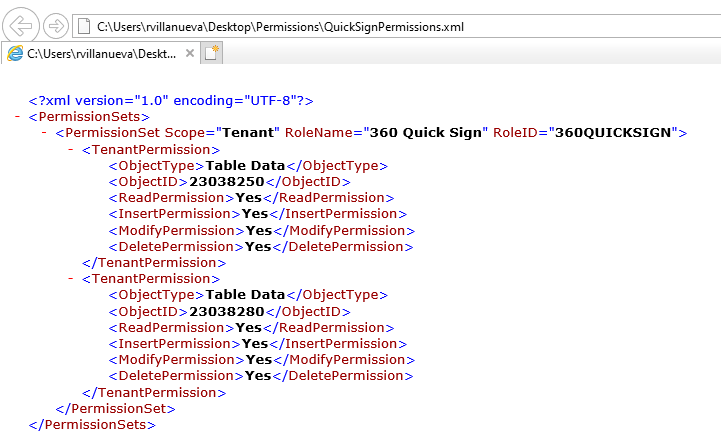
image009

Figure 7: Open the Permission Sets page, then select the Import Permission Sets menu to import a permission set file to Business Central.
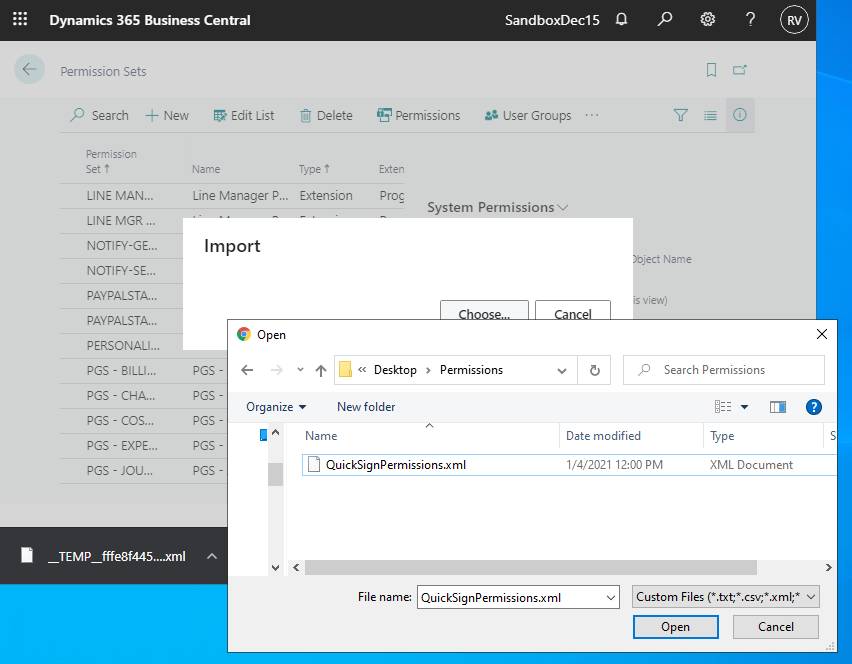
image010

Figure 8: Once the correct Permission Set is imported, you may now assign it to the user and confirm access.

From the User Card > User Permission Set, add a new line and select from the Permission Set lookup.

image007

4. Review per Object Type permissions

HOW TO: Check and modify the effective per Object Type Permissions in the Permission Sets.

After Steps 2 and 3, you may also use the Permission Sets Page for additional object-level permissions updates or create additional custom permission sets for other user profiles/roles.
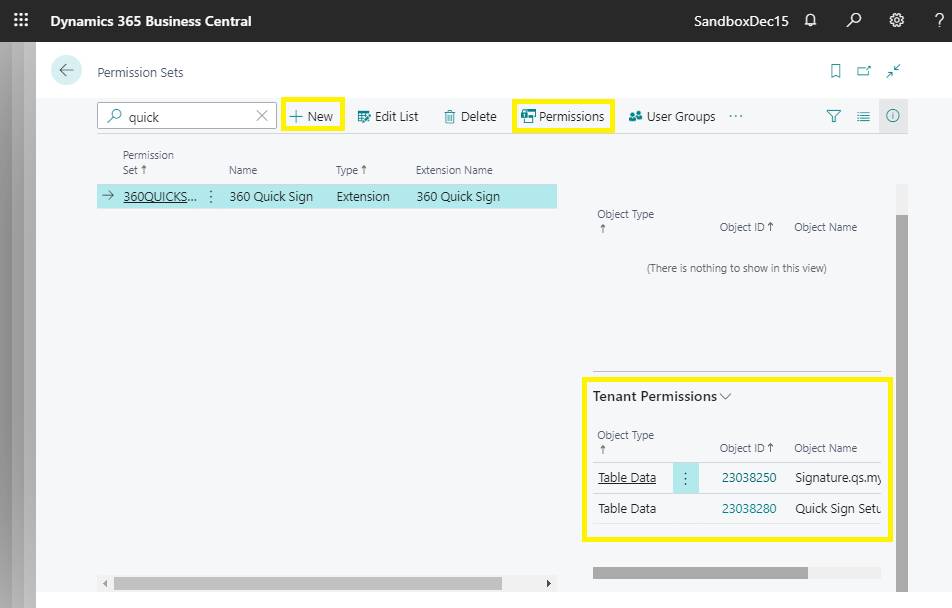
image011

Customer Care

Our team of experienced consultants is always there to support you for assistance in setting up permissions and securing your Business Central implementation and integrations. Our customer care service offers timely answers and support to help you get the best results from your Microsoft Dynamics, Office 365, or Azure Cloud solution.

Want More Business Central Tips and How-To’s?

How to Create a Vendor Payment in Dynamics 365 Business Central
How to Enter Multiple Lines in a Sales Order in Dynamics 365 Business Central
How to Setup a Default Expense Account for a Vendor in Business Central
1707492555426

Randy Villanueva

As a Senior Dynamics Consultant, Randy is responsible for development projects, conversions, integrations and migrations. He has extensive development and implementation experience in Business Central & Dynamics NAV, and delivered successful projects involving multiple industries including finance, manufacturing, non-profit and transportation. Randy is a Microsoft Certified Dynamics 365 Business Central Functional Consultant and holds a Bachelor of Science in Mathematics – with a major in Computer Science - from the University of Santo Tomas.

See all my posts

Related Posts

  • Microsoft Dynamics 365 Business Central

Oct 31, 2025

Best Practices for Managing Business Central Database Capacity

Finance leaders: Don’t let hidden data costs slow you down. Proactive database capacity management in Business Central cuts expenses, boosts performance, and ensures compliance—unlock agility and scalability for your ERP.

Keep reading
  • Microsoft Dynamics NAV
  • Microsoft Dynamics 365 Business Central

Oct 28, 2025

Microsoft Dynamics NAV to Dynamics 365 Business Central Upgrade: 5 Insider Insights from a Senior Business Central Functional Consultant

Thinking of upgrading from Dynamics NAV to Business Central? It’s more than a technical shift—it’s a strategic leap into Microsoft’s evergreen ecosystem. Discover five industry-specific insights that reveal how this transition unlocks new capabilities in finance, manufacturing, professional services, and more.

Keep reading
  • Microsoft Dynamics 365 Business Central

Jun 19, 2025

Dynamics 365 Business Central 2025 Release Wave 1 Updates – Here is what your business could accomplish with them

This guide explores the core Dynamics 365 Business Central capabilities, highlights what’s coming in the 2025 Wave 1 release, and provides honest insights from our implementation experience.

Keep reading
360 Visibility

360 Visibility is North America’s leading AI-first Microsoft Cloud Partner, helping businesses See Clearly and Act Faster.

With 20+ years of expertise in Microsoft 365, Dynamics 365, Azure, and Copilot, we deliver purpose-built AI solutions that transform operations and drive measurable impact.

microsoft solutions partner, dynamics 365 business central implementation partner, dynamics 365 sales implementation partner
microsoft solutions partner, microsoft 365 security, defender, entra id, cloud security, microsoft purview
microsoft solutions partner, microsoft 365, office 365, sharepoint, teams phone system
microsoft solutions partner, azure cloud, cloud migration, it governance, technology advisory
Dynamics 365 Services
  • Dynamics 365 Business Central Partner
  • Dynamics 365 Business Central Implementation
  • Dynamics GP to Business Central Migration
  • Dynamics NAV to Business Central Upgrade
  • Dynamics 365 Sales Implementation
Copilot AI Services
  • Copilot AI Agent Business Impact Assessment
  • Copilot AI Leadership Circle
  • Microsoft 365 Copilot Readiness Assessment
  • Microsoft Copilot AI
Business Advisory Services
  • Business Impact Assessment
  • Quarterly Business Review
Azure Cloud Services
  • Azure Cloud Implementation Partner
  • Managed Azure Services Provider
  • Cloud Migration & Application Modernization
  • Azure Virtual Desktop
  • IT Governance
Cloud Security Services
  • Microsoft 365 Managed Security Administration
  • Backup and Disaster Recovery
  • Data Loss Prevention
  • Insider Risk Management
  • Identity and Access Management
  • Information Protection
  • Entra ID Backup
Company & Resources
  • Blog
  • About 360 Visibility
  • Careers
  • Case Studies
  • Documentation
  • Contact Us
Legal & Technical
  • Terms and Conditions
  • Privacy Policy
  • Support
  • Clarity CSP Portal

See Clearly. Act Faster.

Copyright © 2026 360 Visibility Inc. All Rights Reserved

✕
✕
✕
No results See all results
  • Dynamics 365
    • Business Central Services
    • Business Central Implementation
    • Dynamics GP to Business Central Migration
    • Dynamics NAV to Business Central Upgrade
    • Business Central Integrations
    • Quick Links
    • Dynamics 365 Business Central Demo Videos
    • Business Central Apps
    • Contactless Banking Bundle for Dynamics 365 Business Central
    • Business Central Blog
    • ERP Evaluation Guide
    • Dynamics 365 Solutions
    • Dynamics 365 Business Central
    • Dynamics 365 Sales
    • Dynamics 365 Contact Center
    • Microsoft Dynamics GP
    • Microsoft Dynamics NAV
  • Cloud
    • Azure Cloud Services
    • Azure Cloud Managed Services
    • Cloud Migration and Modernization
    • Azure Virtual Desktop
    • Quick Links
    • Cloud Blog
    • Cloud Migration Guide
    • Cloud Cost Optimization Playbook
    • Cloud Solutions
    • Azure Cloud
    • Power Platform
  • Microsoft 365
    • Microsoft 365 Services
    • Microsoft 365 Implementation
    • Microsoft 365 Support Services
    • Microsoft 365 Security Administration
    • Microsoft 365 Backup and Disaster Recovery
    • Cybersecurity Services
    • Purview Data Loss Prevention
    • Purview Insider Risk Management
    • Purview Information Protection
    • Entra ID Identity and Access Management (IAM)
    • Entra ID Backup and Recovery
    • Microsoft 365 Solutions
    • Microsoft 365
    • Microsoft Teams Phone
    • Microsoft Places
    • Outlook Email Signature Management
  • Copilot & AI
    • Microsoft Copilot and AI Services
    • Copilot AI Leadership Circle
    • Copilot AI Agent Business Impact Assessment
    • Microsoft 365 Copilot AI Readiness Assessment
    • Quick Links
    • Microsoft 365 Copilot Offer
    • Microsoft 365 Copilot Implementation Guide
    • Copilot and AI Blog
    • Copilot and AI Solutions
    • Microsoft Copilot
    • Microsoft SharePoint
  • Advisory Services
    • Clarity CSP Portal
    • Business Impact Assessment
    • IT Governance
    • Microsoft License Optimization
    • Quarterly Business Review
  • Industries
    • Wholesale Distribution
    • Financial Services
    • Nonprofit
    • Professional Services
    • Software
    • Hospitality
  • Resources
    • Blog
    • Case Studies
    • Documentation
    • Support
  • About
    • About Us
    • Why Work With Us
    • Partner
    • Careers
Contact Us
Clarity
Chat with Claire