360 Visibility
  • Dynamics 365
    Business Central Services
    • Business Central Implementation
    • Dynamics GP to Business Central Migration
    • Dynamics NAV to Business Central Upgrade
    • Business Central Integrations
    Complimentary Systems Assessment
    Quick Links
    • Business Central Demo Videos
    • Business Central Apps
    • Business Central Contactless Banking Bundle
    • Business Central Blogs
    • ERP Evaluation Guide
    Customer Stories
    dk household brands partners with 360 Visibility to implement Dynamics 365 Business Central

    DK Household Brands implements Business Central with full EDI, WMS, and Shipping integration.

    Read the story
    Dynamics 365 Solutions
    • Dynamics 365 Business Central
    • Dynamics 365 Sales
    • Dynamics 365 Contact Center
    • Dynamics GP
    • Dynamics NAV
  • Cloud
    Azure Cloud Services
    • Azure Cloud Managed Services
    • Cloud Migration and Modernization
    • Azure Virtual Desktop
    Cloud Infrastructure Assessment
    Quick Links
    • Cloud Blog
    • Cloud Migration Guide
    • Cloud Cost Optimization Playbook
    Customer Stories

    How Azure cloud turned physical hardware bottlenecks into a secure, limitless engine for software growth.

    Read the story
    Cloud Solutions
    • Azure Cloud
    • Power Platform
  • Microsoft 365
    Microsoft 365 Services
    • Microsoft 365 Implementation
    • Microsoft 365 Support Services
    • Microsoft 365 Security Administration
    • Microsoft 365 Backup and Disaster Recovery
    Complimentary Microsoft License Audit
    Cybersecurity Services
    • Device Management & Security
    • Ransomware & Endpoint Security
    • Purview Data Loss Prevention
    • Purview Insider Risk Management
    • Purview Information Protection
    • Entra ID Identity and Access Management (IAM)
    • Entra ID Backup and Recovery
    Customer Stories
    pain specialists of america works with 360 Visibility to enhance security and control over Azure

    How reclaiming IT control from their MSP slashed Pain Specialists of America's security incidents by 30%.

    Read the story
    Microsoft 365 Solutions
    • Microsoft 365
    • Microsoft Teams Phone
    • Microsoft Places
    • Outlook Email Signature Management
  • Copilot & AI
    Microsoft Copilot & AI Services
    • Copilot AI Leadership Circle
    • Copilot AI Agent Business Impact Assessment
    Complimentary AI Readiness Snapshot
    Quick Links
    • Microsoft 365 Copilot Offer
    • Microsoft 365 Copilot Implementation Guide
    • Copilot and AI Blog
    Customer Stories

    Financial Services Firms' Custom AI Agent for Case Management automates bulk document analysis, saving 35+ hours daily.

    Read the story
    Copilot & AI Solutions
    • Microsoft Copilot
    • Microsoft SharePoint
  • Advisory Services
    • Clarity CSP Portal
    • Business Impact Assessment
    • IT Governance
    • Microsoft License Optimization
    • Quarterly Business Review
  • Industries
    • Wholesale Distribution
    • Financial Services
    • Nonprofit
    • Professional Services
    • Software
    • Hospitality
  • Resources
    • Blog
    • Case Studies
    • Documentation
    • Support
  • About
    • Why Work With Us
    • Partner
    • Careers
✕
No results See all results
Contact Us
Clarity
360 Visibility
burger-bar

Home / Blog / Microsoft Dynamics 365 Contact Center / The Future of Customer Support: Microsoft’s AI-Powered Contact Center Platform Explained

The Future of Customer Support: Microsoft’s AI-Powered Contact Center Platform Explained

A contact center powered by AI can significantly improve customer satisfaction and agent efficiency. With features like automated issue resolution and intelligent routing, businesses can reduce wait times and resolve customer queries faster.

Marco-Dercole-Headshot-Square
Marco D'Ercole

Published: Mar 11, 2025 •

dynamics 365 contact center and crm
Table of Contents
  1. Why an AI-Powered CRM Contact Center is Crucial for Business Success
  2. Understanding Dynamics 365 Contact Center as a CRM and AI Contact Center Solution
  3. Key Features of Microsoft Dynamics Contact Center
  4. Transforming Your Dynamics 365 Call Center with Advanced Capabilities
  5. Step-by-Step Guide to Install Dynamics 365 Contact Center
  6. How to Set Up Your Dynamics 365 Contact Center Trial
  7. Best Practices for Optimizing Your Contact Center
  8. Real-World Success Stories
  9. Understanding Dynamics 365 Contact Center Pricing Options
  10. Future Roadmap and Updates
  11. Conclusion and Next Steps

Why an AI-Powered CRM Contact Center is Crucial for Business Success

Providing top-notch customer service isn’t just a nice-to-have—it’s absolutely crucial for success. We can’t afford to overlook this essential aspect of our operations. Dynamics 365 Contact Center offers a comprehensive solution for managing customer interactions across multiple channels. Dynamics 365 Contact Center leverages AI to transform customer interactions and streamline support processes. By automating routine tasks and providing intelligent insights, it allows your team to focus on what truly matters: delivering exceptional customer experiences. This guide will walk you through the implementation and optimization of this powerful tool, helping you transform your customer engagement strategy.

dynamics 365 contact center is an ai-powered omnichannel contact center solution that integrates with Dynamics 365 CRM

What does an AI Contact Center do?

A contact center powered by AI can significantly improve customer satisfaction and agent efficiency. With features like automated issue resolution and intelligent routing, businesses can reduce wait times and resolve customer queries faster. Real-time sentiment analysis helps agents tailor their responses, leading to more personalized interactions. Moreover, the omnichannel support ensures a seamless experience across various communication platforms, meeting customers where they are most comfortable.

Who can benefit from an AI Contact Center?

Who benefits from this solution? Essentially, any business that values customer relationships. From small startups to large enterprises, Microsoft Dynamics 365 Contact Center offers cutting-edge AI features that benefit businesses of all sizes. It’s particularly valuable for companies in industries with high customer interaction volumes, such as retail, finance, healthcare, and technology services.

Now that we understand the importance of an AI-powered contact center, let’s dive into how you can implement and optimize Dynamics 365 Contact Center for your business.

dynamics 365 contact center integrates with the Microsoft dataverse

Understanding Dynamics 365 Contact Center as a CRM and AI Contact Center Solution

Before diving into the implementation process, it’s crucial to understand what sets Dynamics 365 Contact Center apart. As a CRM contact center, Dynamics 365 integrates customer data seamlessly with communication tools. This integration allows for a 360-degree view of customer interactions, enabling more personalized and efficient service.

Key benefits include:

  • Unified customer data across all touchpoints
  • AI-driven insights for better decision-making
  • Seamless integration with other Microsoft tools

Key Features of Microsoft Dynamics Contact Center

Microsoft Dynamics Contact Center leverages Microsoft Copilot AI to enhance customer engagement and agent productivity. Let’s explore some of its standout features:

  1. AI-Powered Self-Service: Empower customers to find solutions independently, reducing the load on your agents.
  2. Intelligent Routing: Ensure customer queries are directed to the most suitable agent based on skills and availability.
  3. Unified Agent Desktop: Provide agents with all necessary information in one place for efficient query resolution.
  4. Analytics and Reporting: Gain insights into performance metrics and customer behavior to continually improve service.
intelligent routing using AI in dynamics 365 contact center
voice self service in dynamics 365 contact center

Transforming Your Dynamics 365 Call Center with Advanced Capabilities

Transform your traditional call center into a modern customer engagement hub with Dynamics 365 Call Center capabilities. The platform offers:

  • Omnichannel support (voice, chat, email, social media)
  • AI-assisted agent suggestions for faster resolution
  • Real-time sentiment analysis for improved customer satisfaction
microsoft copilot ai in dynamics 365 contact center

Step-by-Step Guide to Install Dynamics 365 Contact Center

To install Dynamics 365 Contact Center, start by ensuring your system meets the necessary requirements. Follow these steps:

  1. Assess Your Infrastructure: Ensure your network and hardware meet Microsoft’s specifications.
  2. Plan Your Deployment: Decide on cloud, on-premises, or hybrid deployment based on your needs.
  3. Set Up Your Environment: Use the Dynamics 365 admin center to create your instance.
  4. Configure User Access: Set up roles and permissions for your team.
  5. Customize Your Setup: Tailor the system to your specific business processes.

How to Set Up Your Dynamics 365 Contact Center Trial

It is recommended to always find a partner like 360 Visibility to help you to review all of the capabilities, in-depth setup, scenarios, custom workflows, and automations, but if you want to do some testing by yourself these are the 5 quick steps

  1. Visit the Microsoft Dynamics 365 website
  2. Click on “Free Trial” for Contact Center
  3. Fill in your details and create an account
  4. Access your trial environment
  5. Explore features and set up test scenarios

During your trial, focus on testing key functionalities that align with your business needs.

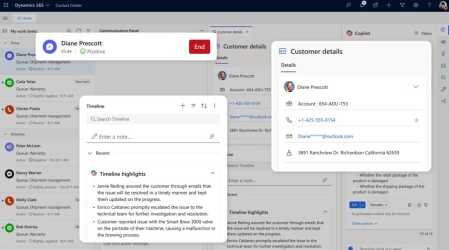
dynamics 365 contact center customer service dashboard

Best Practices for Optimizing Your Contact Center

To get the most out of Dynamics 365 Contact Center, consider these optimization strategies:

  1. Leverage AI Capabilities: Utilize Copilot for automated case resolution and intelligent routing.
  2. Integrate with Existing Systems: Ensure seamless data flow between Dynamics 365 and your other business tools.
  3. Customize Workflows: Tailor processes to match your unique customer journey.
  4. Train Your Team: Invest in comprehensive training for agents and administrators.
  5. Monitor and Iterate: Regularly review analytics to identify areas for improvement.

Real-World Success Stories

Many organizations have seen significant improvements after implementing Dynamics 365 Contact Center. For instance:

  • A financial services company reduced call handling times by 25% using AI-assisted agent suggestions.
  • A retail chain increased customer satisfaction scores by 15% through improved routing and personalized service.

These success stories highlight the potential impact of a well-implemented contact center solution.

Understanding Dynamics 365 Contact Center Pricing Options

Dynamics 365 Contact Center pricing options are designed to scale with your business needs.

  • Dynamics 365 Contact Center provides core functionality to transform customer engagement across digital and voice channels with an all-in-one solution. Starting at $110/user/month
  • Dynamics 365 Customer Service Premium transforms customer engagement with an integrated contact center and CRM service solution—all powered by generative AI. Starting at $195/user/month

Contact 360 Visibility for a customized quote based on your requirements.

Future Roadmap and Updates

Microsoft continually enhances Dynamics 365 Contact Center. Upcoming features to look forward to include:

  • Enhanced administrator experiences with a modern interface
  • Extended AI capabilities with expanded Copilot functionality
  • Advanced security features including biometric authentication

Stay informed about these updates to ensure you’re leveraging the latest capabilities.

Conclusion and Next Steps

Implementing Dynamics 365 Contact Center can significantly enhance your customer engagement strategy. By following the steps outlined in this guide and leveraging best practices, you can transform your contact center into a powerful tool for customer satisfaction and business growth.

Ready to take the next step? Contact 360 Visibility to start your Dynamics 365 Contact Center demo today and experience firsthand how it can revolutionize your customer service operations.

Marco-Dercole-Headshot-Square

Marco D'Ercole

Marco is the Executive Vice President and one of the co-founders of 360 Visibility. He is recognized in the industry as an expert at developing and aligning an organization’s technology with their business strategy in a cost-effective and innovative way.

See all my posts

Related Posts

There are no posts on the list.
360 Visibility

360 Visibility is North America’s leading AI-first Microsoft Cloud Partner, helping businesses See Clearly and Act Faster.

With 20+ years of expertise in Microsoft 365, Dynamics 365, Azure, and Copilot, we deliver purpose-built AI solutions that transform operations and drive measurable impact.

microsoft solutions partner, dynamics 365 business central implementation partner, dynamics 365 sales implementation partner
microsoft solutions partner, microsoft 365 security, defender, entra id, cloud security, microsoft purview
microsoft solutions partner, microsoft 365, office 365, sharepoint, teams phone system
microsoft solutions partner, azure cloud, cloud migration, it governance, technology advisory
Dynamics 365 Services
  • Dynamics 365 Business Central Partner
  • Dynamics 365 Business Central Implementation
  • Dynamics GP to Business Central Migration
  • Dynamics NAV to Business Central Upgrade
  • Dynamics 365 Sales Implementation
Copilot AI Services
  • Copilot AI Agent Business Impact Assessment
  • Copilot AI Leadership Circle
  • Microsoft 365 Copilot Readiness Assessment
  • Microsoft Copilot AI
Business Advisory Services
  • Business Impact Assessment
  • Quarterly Business Review
Azure Cloud Services
  • Azure Cloud Implementation Partner
  • Managed Azure Services Provider
  • Cloud Migration & Application Modernization
  • Azure Virtual Desktop
  • IT Governance
Cloud Security Services
  • Microsoft 365 Managed Security Administration
  • Backup and Disaster Recovery
  • Data Loss Prevention
  • Insider Risk Management
  • Identity and Access Management
  • Information Protection
  • Entra ID Backup
Company & Resources
  • Blog
  • About 360 Visibility
  • Careers
  • Case Studies
  • Documentation
  • Contact Us
Legal & Technical
  • Terms and Conditions
  • Privacy Policy
  • Support
  • Clarity CSP Portal

See Clearly. Act Faster.

Copyright © 2026 360 Visibility Inc. All Rights Reserved

✕
✕
✕
No results See all results
  • Dynamics 365
    • Business Central Services
    • Business Central Implementation
    • Dynamics GP to Business Central Migration
    • Dynamics NAV to Business Central Upgrade
    • Business Central Integrations
    • Quick Links
    • Dynamics 365 Business Central Demo Videos
    • Business Central Apps
    • Contactless Banking Bundle for Dynamics 365 Business Central
    • Business Central Blog
    • ERP Evaluation Guide
    • Dynamics 365 Solutions
    • Dynamics 365 Business Central
    • Dynamics 365 Sales
    • Dynamics 365 Contact Center
    • Microsoft Dynamics GP
    • Microsoft Dynamics NAV
  • Cloud
    • Azure Cloud Services
    • Azure Cloud Managed Services
    • Cloud Migration and Modernization
    • Azure Virtual Desktop
    • Quick Links
    • Cloud Blog
    • Cloud Migration Guide
    • Cloud Cost Optimization Playbook
    • Cloud Solutions
    • Azure Cloud
    • Power Platform
  • Microsoft 365
    • Microsoft 365 Services
    • Microsoft 365 Implementation
    • Microsoft 365 Support Services
    • Microsoft 365 Security Administration
    • Microsoft 365 Backup and Disaster Recovery
    • Cybersecurity Services
    • Purview Data Loss Prevention
    • Purview Insider Risk Management
    • Purview Information Protection
    • Entra ID Identity and Access Management (IAM)
    • Entra ID Backup and Recovery
    • Microsoft 365 Solutions
    • Microsoft 365
    • Microsoft Teams Phone
    • Microsoft Places
    • Outlook Email Signature Management
  • Copilot & AI
    • Microsoft Copilot and AI Services
    • Copilot AI Leadership Circle
    • Copilot AI Agent Business Impact Assessment
    • Microsoft 365 Copilot AI Readiness Assessment
    • Quick Links
    • Microsoft 365 Copilot Offer
    • Microsoft 365 Copilot Implementation Guide
    • Copilot and AI Blog
    • Copilot and AI Solutions
    • Microsoft Copilot
    • Microsoft SharePoint
  • Advisory Services
    • Clarity CSP Portal
    • Business Impact Assessment
    • IT Governance
    • Microsoft License Optimization
    • Quarterly Business Review
  • Industries
    • Wholesale Distribution
    • Financial Services
    • Nonprofit
    • Professional Services
    • Software
    • Hospitality
  • Resources
    • Blog
    • Case Studies
    • Documentation
    • Support
  • About
    • About Us
    • Why Work With Us
    • Partner
    • Careers
Contact Us
Clarity
Chat with Claire